Operator screens, built from your PLC tag data.
HMI Forge is an AI-first, vendor-neutral builder for industrial HMIs. Bring an I/O list, a PLC export or a live device, design the screens by chat or on the canvas, and export a validated project to the platform your site already runs.
Works with a cloud AI model, a local model, or the built-in assistant with no AI at all.

- Screen
- Driller's console, built from the 27-tag drilling sample
- Mode
- Try as operator, simulated values
- Style
- Glass
- Checks
- Ready to export
From tag list to running screen
Three steps. The third one is gated: nothing leaves HMI Forge until it passes validation.
-
Bring the data
Drop in the tag data you already have, or point HMI Forge at a device. Tags are grouped into equipment, and whether a tag can be written comes from the source system, not from a guess.
- Excel and CSV I/O lists, Modbus maps
- Rockwell Studio 5000 L5X
- Siemens TIA Portal tag tables and DBs
- OPC UA NodeSet2 files and live servers
- Modbus TCP, HTTP JSON, MQTT, TCP and UDP devices
-
Design by chat or on the canvas
Ask for “a driller's console with big gauges for hookload and standpipe pressure”, or select widgets and say “make it digital”. Every change is a numbered revision you can revert in one click.
- Cloud AI providers or a local model
- A built-in assistant that needs no network
- Snapping, alignment, copy and paste, undo
- Components that bind a whole pump or tank at once
-
Export, validated
Bindings must point at real tags of a compatible type, write controls need writable tags and ranges, and navigation targets must exist. Errors block the export; warnings are listed for review.
- Ignition Perspective 8.1 and 8.3
- FUXA
- Node-RED Dashboard 2.0
- Standalone web HMI for a panel PC
Gauges that show whether it has been fine
The round dials, needles and limit colours operators trust, with the context they usually have to leave the screen to find.
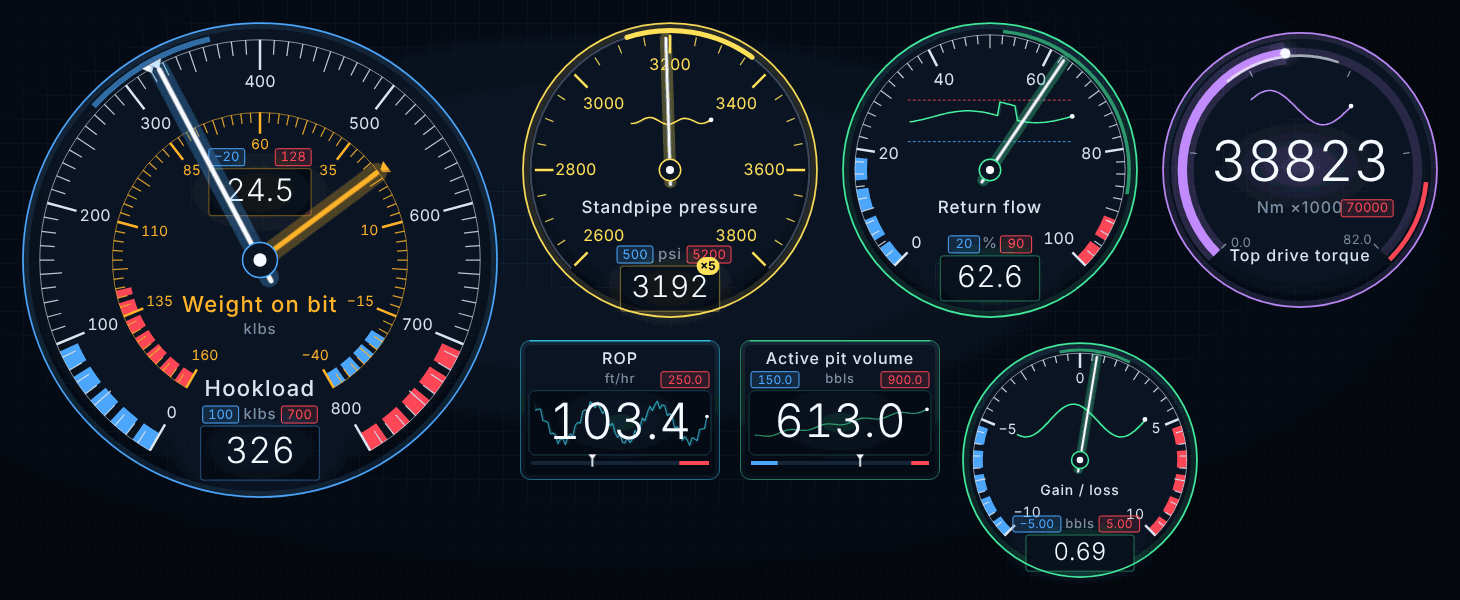
History in the gauge
A live chart inside the dial or readout covers the last 30 seconds to an hour, with the min–max envelope and every excursion past a limit marked in the alarm colour.
Precision zoom
The scale re-ranges 2 to 20 times finer around a steady value. Any alarm, bad data or fast change returns the full scale at once.
Console instruments
Dual-needle dials for hookload with weight on bit, centre-zero dials for gain/loss, linear bars, compasses, stack lights and operating envelopes.
Bad data looks bad
A silent or unreachable device shows
####in the comms colour, never a false zero.
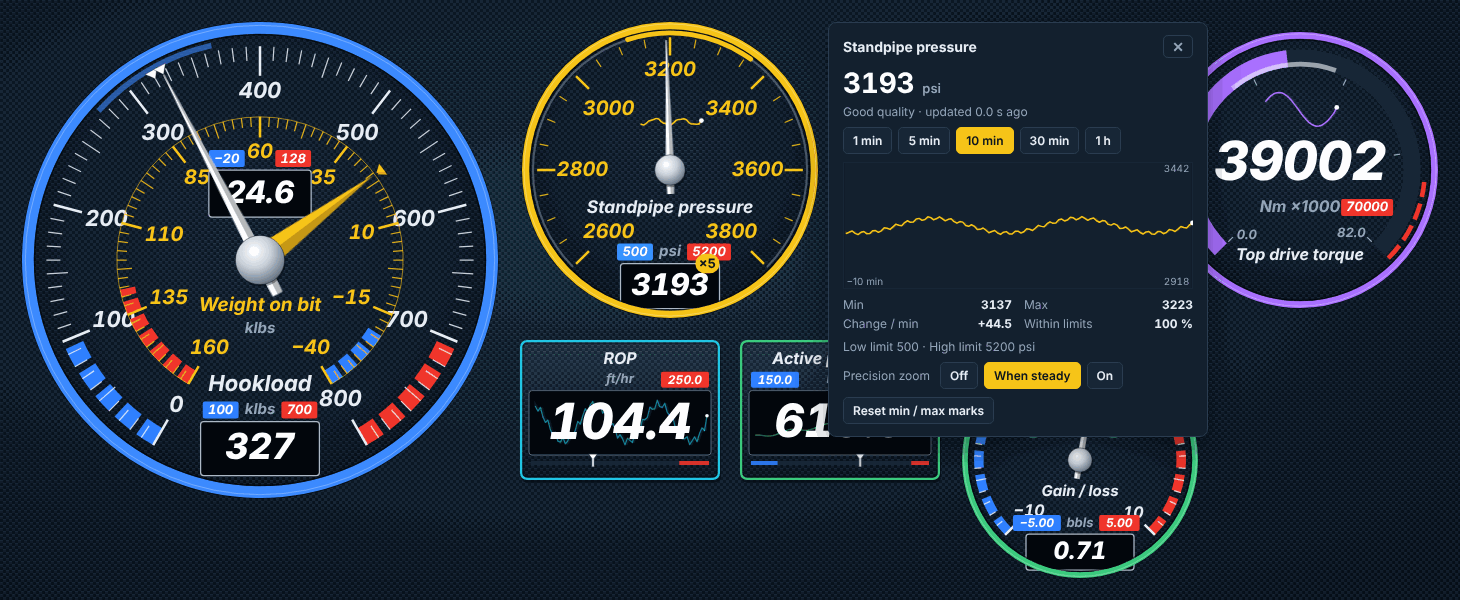
Tap a gauge for the detail
The live value with quality and age, the active alarm, a larger chart, min, max, rate of change and the share of the window within limits. Operators can change the history window and zoom for that gauge. The panel never writes to the process.
Three styles, one project
High performance (ISA-101) by default: grey, with colour only for abnormal states. Console and glass styles for drilling and control-room consoles, set per project and overridable per widget.
Live data, and a runtime for the panel PC
Connect a device while you design, then run the screens on the machine next to the equipment.
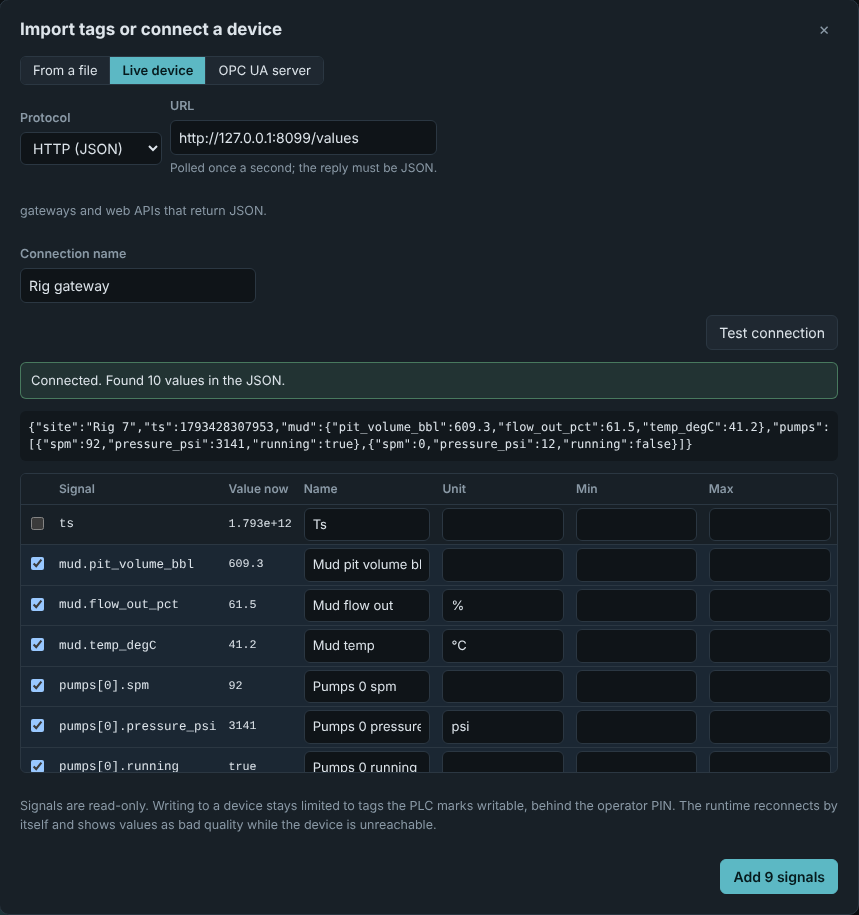
pressure_psi.Connect a device
Choose the protocol, give the address and click Test connection. JSON becomes named signals. Modbus registers and binary frames are never guessed: you see candidate decodings and name the values you recognise.
Standalone web HMI
A runtime for any PC, panel PC or Raspberry Pi, with Modbus TCP and OPC UA drivers and simulation built in. It ships with a Dockerfile, a sandboxed systemd unit and a Windows start-up task.
Honest about the connection
The runtime reconnects with backoff and shows values as bad quality while a device is silent. It keeps an hour of per-second history for every gauge, so charts are complete when a screen opens, and every browser sees the same values and alarms.
- Modbus TCP
- HTTP (JSON)
- MQTT
- TCP stream
- UDP datagrams
- OPC UA
Writes are deliberate. Exports are checked.
The assistant can propose anything. Code decides what reaches a screen, and what reaches the process.
A validation gate on every export
Bindings must point at real tags of a compatible type, alarm limits must be in order and navigation targets must exist. Errors block the export.
Enforced invalidator and every exporter
Writes only through explicit controls
Buttons and setpoints go only on tags the PLC marks writable, with a min/max and a confirmation. In the runtime, writes stay off until an engineer enables them and sets an operator PIN; each request is checked for tag, value and range, rate-limited and audited.
Enforced invalidator and runtime
AI changes go through checked operations
Unknown tags are refused, write confirmation cannot be turned off, and PLC ranges and alarms cannot be changed. The model never sees PLC addresses, and every change is a revision you can revert.
Enforced indesign chat
Nothing generated runs as code
Screens are declarative and exporters emit fixed, reviewed templates. Bool commands pulse, so a stuck client cannot latch an output.
Enforced inexporters and runtime
Interlocks and permissives belong in the PLC. A generated HMI is not a safety system.
Export to the platform the site already runs
One neutral project, four targets. Each export includes its import steps and a manifest with SHA-256 checksums.
Ignition Perspective
8.1 and 8.3
A Perspective project and a Tag Browser import. No scripts anywhere.
FUXA
Open-source web HMI
One project file to open in the FUXA editor, with devices, screens and alarms.
Node-RED
Dashboard 2.0
One flows.json with dashboard pages and the Modbus or OPC UA nodes.
Standalone web HMI
PC, panel PC, Raspberry Pi
Server and operator UI with no npm dependencies, unless the project uses OPC UA.
Any model, or none
Cloud providers such as Claude, OpenAI, Gemini, GroqCloud and Mistral; local models through Ollama, LM Studio, vLLM or llama.cpp; or the built-in assistant, which needs no network and suits sites where cloud AI is not allowed.
A shared library for the team
Components saved to the library are available to every project on the server. They hold layout and slot names only, never tag names or PLC addresses.
Open the editor
Accounts are created by your administrator.